Faster Service.
Tighter Food Costs.
Two standalone systems built for restaurants: one keeps service moving, the other helps you stop losing money on stock, waste, and purchasing.
Two Independent Systems. One Complete Solution.
Use Kitchen Display System for order flow, Inventory Management for stock control, or both together. Each works standalone—integration is optional but powerful.
Kitchen Display System (KDS)
Works standalone • Integrates with any POS
Reduce kitchen chaos, speed up ticket flow, and keep front-of-house and kitchen aligned during every service.
Smart Kitchen Display
Keep orders moving without the chaos. Staff see what matters first, so service stays fast even during rush hour.
Multi-Role Workflow
Give kitchen, waitstaff, and managers a clear view of their work so handoffs are smoother and mistakes drop.
Real-Time Order Tracking
See every order stage in real time, reduce delays, and stop customers waiting on missing or forgotten items.
Flexible Table Management
Seat guests faster, manage busy floors with less friction, and keep table service organized during peak periods.
Universal Payments
Handle cash and card payments with fewer end-of-shift surprises and cleaner reconciliation for your team.
Kitchen Analytics
Spot bottlenecks, improve prep speed, and coach staff with numbers you can actually act on.
Inventory Management System (IMS)
Works standalone • Import sales or integrate with KDS
Stop losing money from stock mismanagement and make faster, smarter purchasing decisions.
Catch Stock Losses Early
See where stock is going, spot mistakes sooner, and stop small losses from turning into expensive problems.
Count Faster With Fewer Mistakes
Make stock counts quicker, more consistent, and less stressful for staff during busy operations.
Stop Stockouts and Over-Ordering
Buy the right amount at the right time so you do not run out of key items or tie up cash in excess stock.
Control Purchasing Spend
Keep supplier orders organized, catch delivery issues early, and stay in control of what you are spending.
Control Multiple Locations
Manage stock across restaurants with more consistency, clearer visibility, and less back-and-forth between sites.
Know Your True Food Cost
Understand what each dish and prep batch really costs so pricing, portions, and margins stay under control.
Also includes sales imports, mobile workflows, offline desktop deployment, and optional KDS sync.
Every Feature Built for Real Kitchens
No fluff, no complexity. Just the tools you need to catch problems early and keep food costs under control.
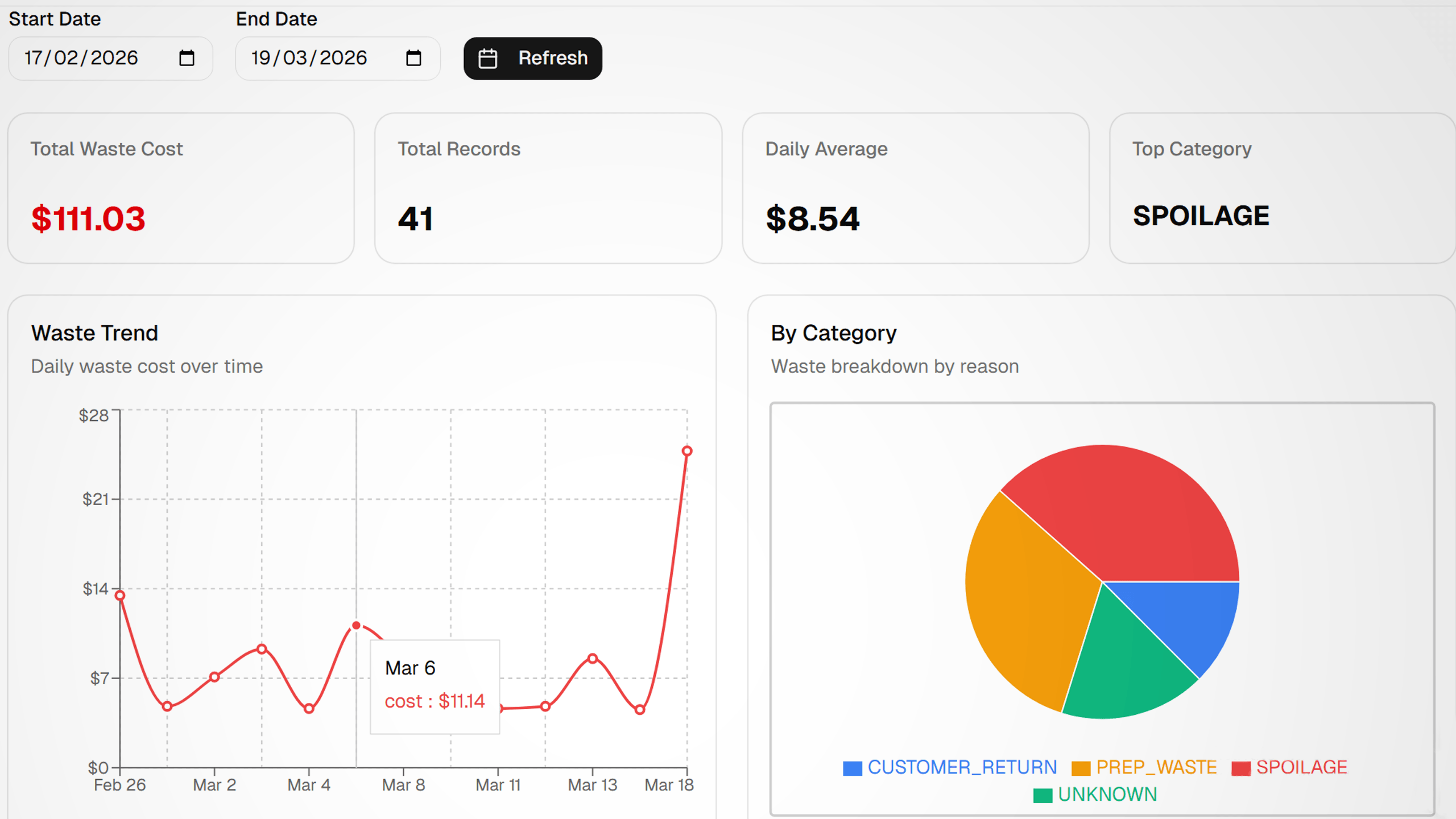
Catch Margin Leaks Before They Hurt
See exactly where your food cost is going with visual waste analysis and COGS tracking.
💡 Spot trends in seconds, not spreadsheets
Ready to Stop Guessing About Food Cost?
Join restaurants that know their numbers down to the penny
Better Together, But Not Required
Use both systems together to reduce admin work and keep food costs visible in real time, or run IMS standalone with sales imports from any POS.
Get Orders to the Kitchen Faster
Orders reach the kitchen immediately, so staff can start sooner and service keeps moving during busy periods.
Keep Prep Clear and On Time
Everyone sees what is cooking, what is ready, and what is delayed, reducing confusion and missed handoffs.
Cut Manual Work
If connected, served items update stock automatically. If not, IMS still works with simple sales imports from your POS.
Protect Margin Every Day
Ingredient usage turns into clear stock and cost visibility, helping you catch waste, overuse, and profit leaks earlier.
Choose the setup that fits your operation
The real point is flexibility, not forcing a bundle.
These options answer the buyer question directly: use both for tighter automation, keep your current POS and run IMS on its own, or start with one product and connect later.
Best when you want automation
Run KDS and IMS Together
Served items can flow into inventory automatically, which cuts double entry and gives you tighter cost visibility during service.
One operational loop from kitchen tickets to stock and margin tracking.
Best when you already have a POS
Keep Your Current POS
IMS still works standalone with mapped sales imports, so you can improve inventory control without replacing your checkout system.
A lower-friction path when inventory problems matter more than changing the front-of-house stack.
Best when rollout speed matters
Start Separate, Connect Later
You can launch one system first, train the team, and add the second system later when the operation is ready for deeper automation.
A phased rollout that lowers adoption risk while preserving the upgrade path.
See It in Action
Beautiful, intuitive interfaces designed for speed and clarity in high-pressure environments.
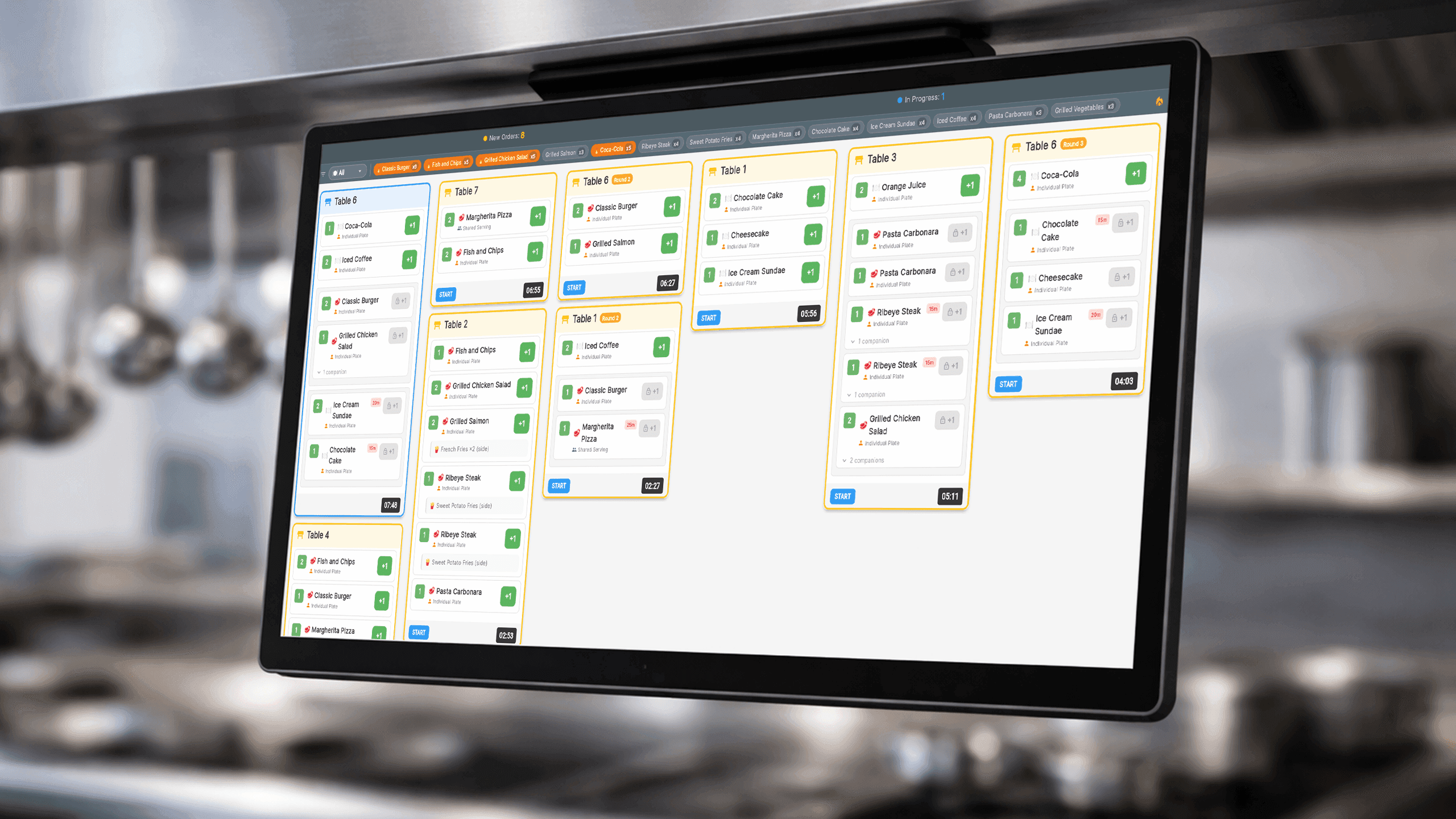
Kitchen Display
Smart layout shows 3-6x more orders with color-coded status indicators
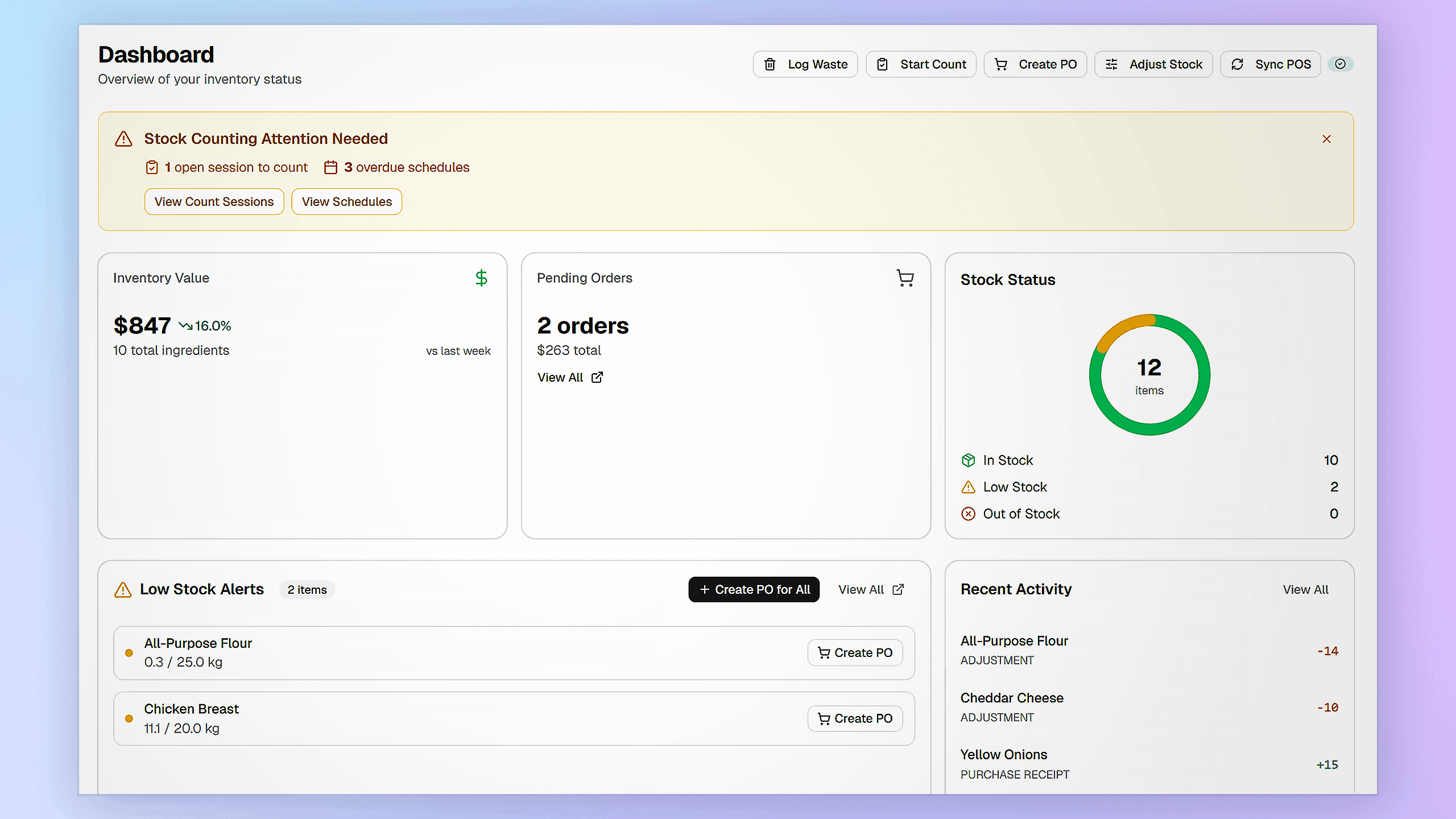
Inventory Dashboard
Real-time stock levels with critical alerts and reorder suggestions
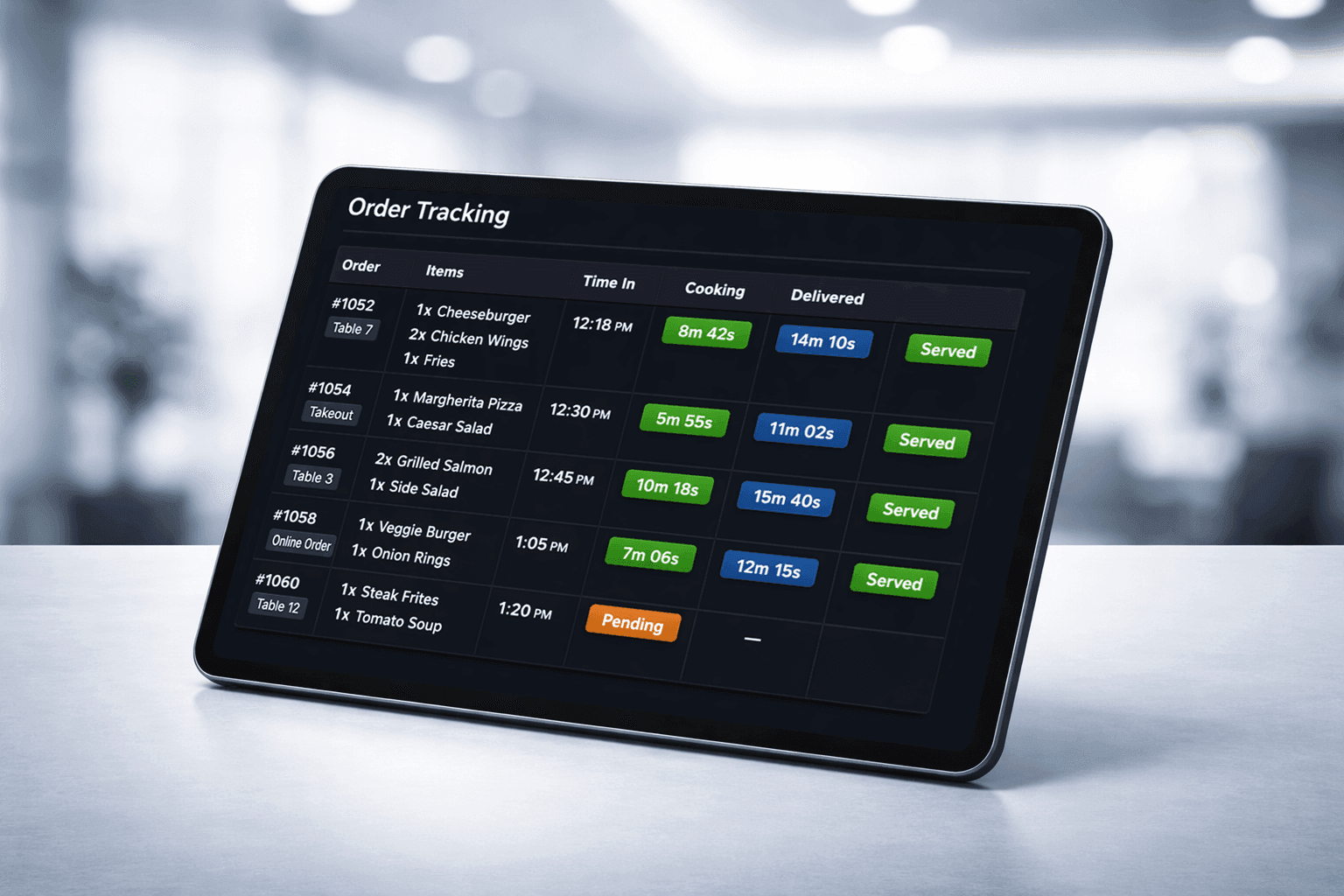
Order Tracking
Track every item from pending to served with detailed time stamps
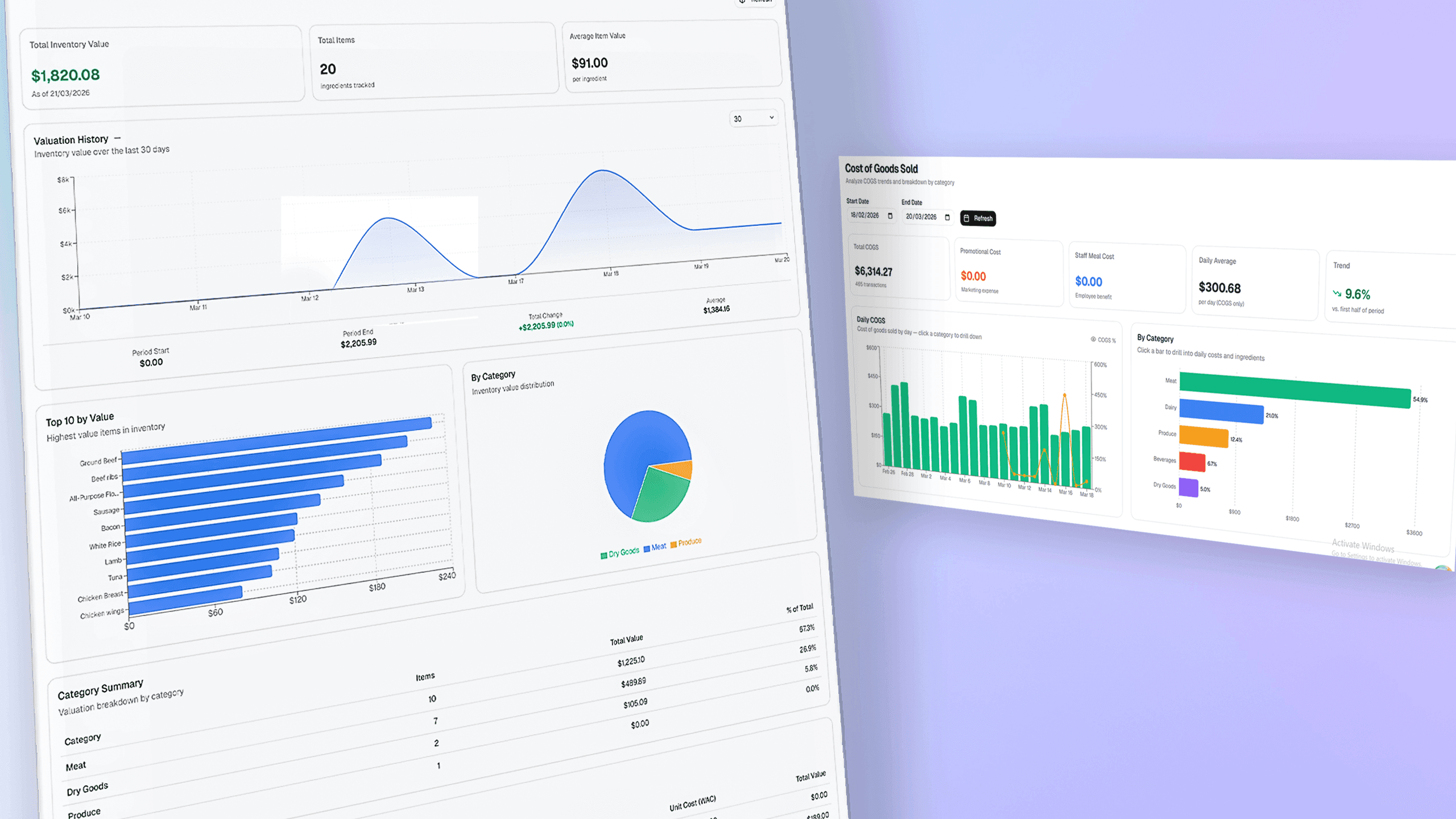
COGS Analytics
Menu profitability at a glance with ingredient cost breakdowns
Choose the Outcome You Need
Start with the system that solves your biggest problem today, or combine both for tighter operations end to end. Every plan includes a 14-day free trial.
Kitchen Display Only
For restaurants that want faster service and less kitchen confusion.
- Keep orders moving during rush hour
- Reduce missed items and handoff mistakes
- Give kitchen and floor staff a shared live view
- Seat and manage tables with less friction
- Handle payments with cleaner reconciliation
- Spot bottlenecks before they slow service
- Email Support
- Mobile App Access
Complete Bundle
For operators who want faster service and automatic food-cost control in one workflow.
- Everything in KDS plus full inventory control
- Turn served orders into automatic stock updates
- Track recipe cost and real margin by item
- Catch waste and stock variance earlier
- Reorder smarter with guided purchasing
- Run multiple locations with more consistency
- Priority Support
- Onboarding Training
- Custom Reports
Inventory Only
For restaurants that need tighter stock control without changing their current POS.
- Stop stockouts and over-ordering
- Count inventory faster with fewer errors
- Understand true usage behind every menu item
- Control purchasing from order to delivery
- Track waste before it hurts profit
- See where your food margin is going
- Email Support
- API Access for Integration
Need custom features or enterprise pricing? Contact us
Frequently Asked Questions
Everything you need to know about ResLoom
Installation is simple and takes just a few steps. The Inventory System (IMS) is installed on your main computer as a desktop app. It also includes a mobile-friendly web app your staff can use on their devices. The Kitchen Display System (KDS) can be installed on kitchen screens as a desktop app, and there is also a mobile version available for supported Android devices. You will get step-by-step guidance, so your team can get up and running without technical headaches.
Still have questions?
Our team is here to help. Get in touch and we'll respond within 24 hours.
Contact Support